Runs
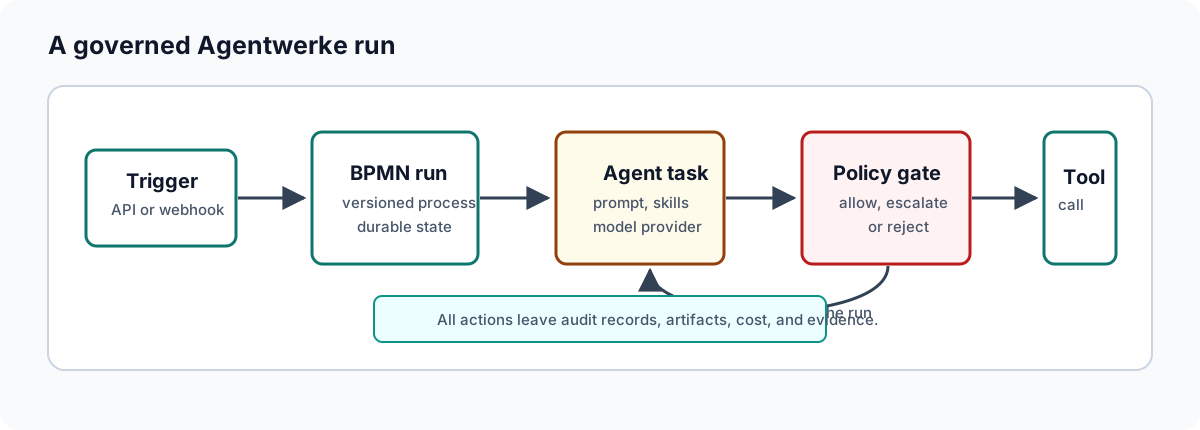
A run is the operator's main unit of work in Agentwerke. It is one execution of a workflow, with its own context, steps, approvals, evidence, and audit trail.
Start a run from the UI
- Open the web UI.
- Go to Runs.
- Choose a workflow or use the seeded sample in the quickstart stack.
- Start the run.
- Open the run detail page.
The run detail view shows the BPMN diagram, step status, approval state, and run events.
Start a run from the API
Use POST /api/runs with the workflow id.
API=http://localhost:8081
TOKEN=<viewer-or-operator-token>

curl -sf "$API/api/runs" \
  -H "Authorization: Bearer $TOKEN" \
  -H "Content-Type: application/json" \
  -d '{"workflowId":"wf-first-run-sample"}'
The API returns the new run id. Use that id for follow-up inspection.
Inspect a run
curl -sf "$API/api/runs/<run-id>" \
  -H "Authorization: Bearer $TOKEN" | jq
Look at:
| Field | What it tells you |
|---|---|
status | Whether the run is active, blocked, completed, or failed. |
currentStep | The workflow step currently holding the run. |
pendingApprovals | Number of approval requests waiting for a decision. |
riskLevel | The current workflow-level risk signal. |
startedAt / completedAt | Runtime duration and completion state. |
Read step history
Each step records status, type, timestamps, agent name, output, and policy decision data. When diagnosing a run, check the first step with a non-success status. The most useful details are usually:
- The step output.
- The policy decision rationale.
- Risk factors.
- Tool constraints.
- Audit events around the same timestamp.
Understand common pauses
| Pause | Cause | Operator action |
|---|---|---|
| Approval | A BPMN approval task is waiting. | Review and approve, reject, or request changes. |
| Human question | An agent used human.ask. | Answer the question in the run conversation. |
| External event | A receive task or catch event is waiting. | Deliver the correlated webhook/event or inspect integration health. |
| Timer | A BPMN timer is active. | Wait, or verify timer configuration if it is unexpected. |
Cancel or recover
Operators can cancel or recover runs through the API and UI surfaces exposed by the product. Prefer recovery when a transient integration, model provider, or dispatch worker issue has been fixed. Prefer cancellation when the run is no longer desired or the underlying workflow definition is wrong.
Before recovery, inspect:
- Whether the failed step is idempotent.
- Whether a connector already created an external artifact, branch, issue, or pull request.
- Whether the run context still matches the current external state.
Operational checklist
- Confirm the run is on the expected workflow version.
- Confirm the initiator and trigger context are expected.
- Check pending approvals before diagnosing a run as stuck.
- Review tool and policy decisions before retrying a failed agent step.
- Download the evidence pack before deleting artifacts or tearing down test data.